
|
|
|
![[Bottom]](bottom.gif)
![[Contents]](nav_contents.jpg)
![[Prev]: Dialog 2826 Bug](prev.gif)
![[Next]: Uninstall of PER-USER Installed MSI Fails with a 1309 Error](next.gif)
 TroubleshootingBugs, Features and Issues (NON-MAKEMSI)IE Script Blocking
|
|
|
|
TroubleshootingBugs, Features and Issues (NON-MAKEMSI)IE Script Blocking| BUG: IE Script Blocking |
WINXP SP2 added script blocking to all html, truely amazing stuff... The message (see below) says it blocks active content that could access your computer, this is not true, it prevents access to any script whether it can access your computer or not. This is because MS have never thought about security before and haven't got a clue as to what to do now. I suspect this change might drive the use of alternative browsers and that MS might come out with a service pack to fix this issue. A reasonable change would have been the prevention of object creation unless allowed, the MS solution is like nuking the planet to eradicate flies...
The following shows a (very) small internet explorer window which is displaying the new message:
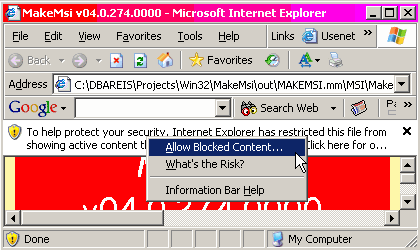
If you wish to prevent this you can generate the HTML documentation as a "HTML Application" (has the extension ".hta"), to do this just change the file extension as in (this is now the default):
#define  MAKEMSI_HTML_EXTENSION  hta
#include "ME.MMH"
| IE Configuration - Disable Checks |
Most people will probably turn off (or want to) this checking, to do
this choose "Start SettingsControl PanelInternet OptionsAdvanced"
then go to the security section (at the end).
Do they really care about security?.
How about a single security configuration applet along the lines of the
Add/Remove Applet, or better yet all configuration centralised.
SettingsControl PanelInternet OptionsAdvanced"
then go to the security section (at the end).
Do they really care about security?.
How about a single security configuration applet along the lines of the
Add/Remove Applet, or better yet all configuration centralised.
In any case these two options deal with the scripting:
Where is the "Allow active content from my file system to run on My Computer" option (via "file://" protocol)?
  |
 MAKEMSI© is (C)opyright Dennis Bareis 2003-2008 (All rights reserved). Saturday May 28 2022 at 3:11pm Visit MAKEMSI's Home Page | |
![[Top]](top.gif)